
Course The Rose - subscriptions: recurring invoices for membership fees and rent (#13, optional)
Much of what a non-profit invoices recurs: the annual membership fee, the monthly rent of a room to another association, a quarterly contribution from a partner, a sponsorship package per season. With subscriptions you create such an invoice once as a template and let The Rose create it, and if you wish send it, on the chosen days. This is the function that saves you the most time as treasurer, and also the function where a mistake multiplies fastest. Hence: set up properly first, then let go.
Part 1: what a subscription is
A subscription is a template invoice (client, lines, prices, VAT) plus a schedule: start date, frequency (monthly, quarterly, annually…) and possibly an end date or a number of times. On each due day of the schedule The Rose creates a real invoice according to the template. That invoice is then an ordinary invoice as in course part 5: with a number, in your overview, and once sent also in the accounts.
Two modes:
- Create only. Under Document to create you choose Invoice Draft (you finalise it yourself) or Invoice (immediately numbered), and under Send automatically you leave Do not send automatically. You send the invoice yourself; only then does it go to the accounts. Safest choice to start with.
- Create and send. Choose Send invoice via email: the invoice goes out automatically by email to the recipients you select. Only switch on once you have seen a few cycles run successfully. For clients who must receive via Peppol (course part 7), you send the created invoice yourself.
Part 2: creating a subscription
Click Subscriptions in the sidebar and then Create. The New Subscription form looks like an invoice, with the schedule at the top:
- the Client;
- the Subscription number (automatic) and the Next execution date: the day on which the first invoice is created; for an annual membership fee e.g. 1 September, for rent the first of the month;
- Document to create: Invoice or Invoice Draft (see part 1);
- Repeat every … days, weeks, months or years: the frequency;
- Number of times to be executed or End execution after a date, if the subscription is finite (e.g. a two-year tenancy); with Pause execution you put it on hold temporarily;
- the lines, exactly as on an invoice (course part 5), with products from your list (course part 4), plus the Document note and any Attachments;
- under Options the Layout, the Payment term in days and the Language;
- under Send automatically: Do not send automatically or Send invoice via email, with the recipients, the subject and the message (empty = your default text).
Click Create subscription (or Save as draft to finish it later).
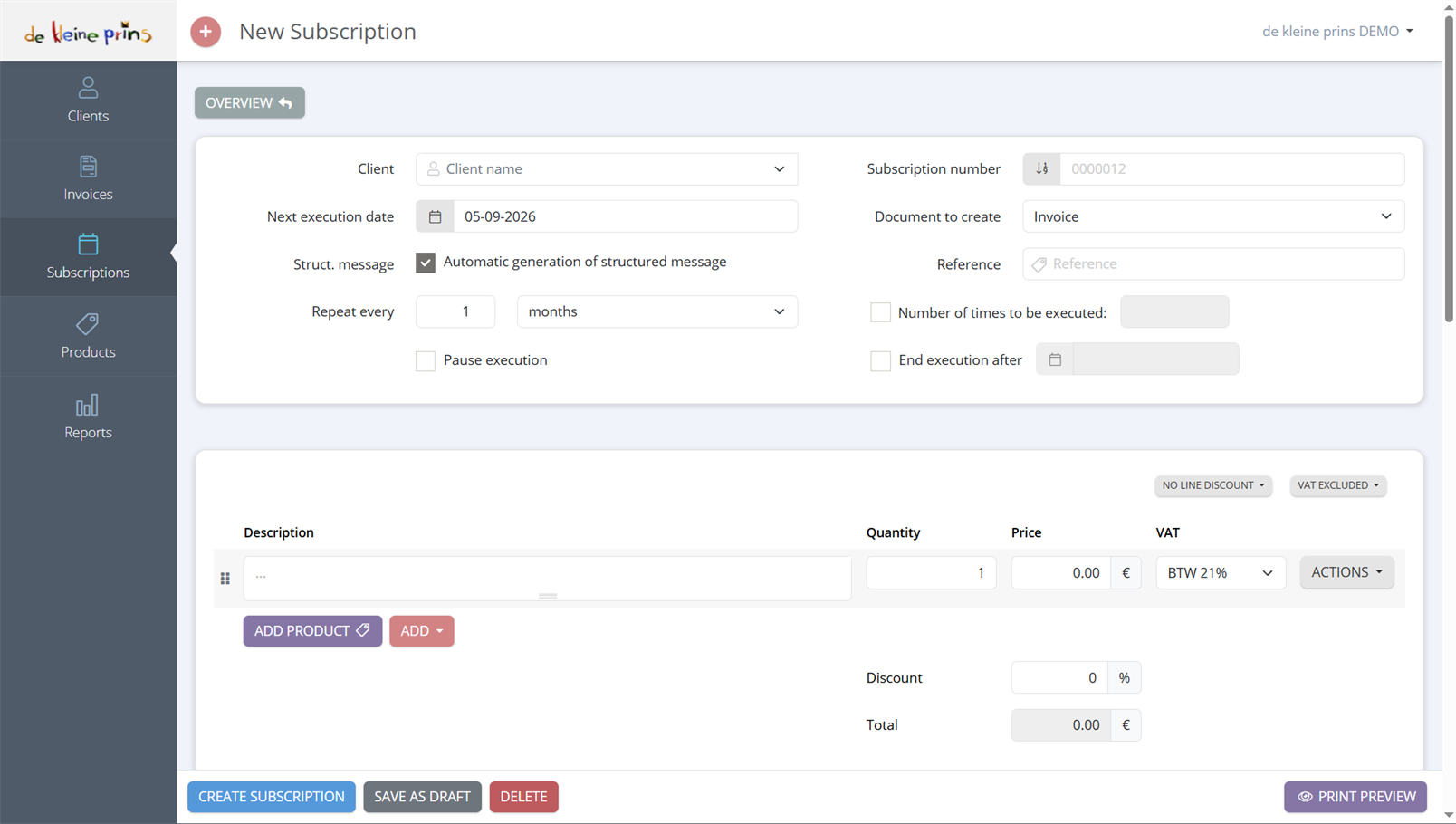
- The schedule: Client, Next execution date, Repeat every (here 1 month), Pause execution, and on the right Subscription number, Document to create (Invoice), Reference, Number of times to be executed and End execution after.
- The lines, exactly as on an invoice.
- Create subscription, Save as draft, Delete and Print preview. The options and the automatic sending follow further down.
Part 3: variables in the description
The description of a subscription line should not be “Membership fee 2026”, because next year that is no longer right. Use variables: pieces of text between percent signs that The Rose replaces with the right value at each invoice. In our demo file you see, for example, the product “Lidgeld %document-date-year% test”: on the 2027 invoice that becomes “Lidgeld 2027”. There are also variables for the month, the quarter, the period from-to, and the client’s name. The full list is in the article on variables for subscriptions.
For rent the period matters: “Rent room %month% %year%” makes clear to the client what they are paying for, and to the accounts in which period the income belongs.
Part 4: price change and indexation
Raising the membership fee, or indexing the rent? Change the price in the subscription, not in the invoices already created. The next invoice uses the new price; the previous ones stay as they were. For an indexation of rent on a contractual date: adjust the subscription before that date, with the indexed price, and mention the indexation once in the description or in the accompanying email. The article on price adjustment and indexation explains it step by step.
If the client changes address or name, adjust the client (course part 3); the subscription automatically takes over the new details.
Part 5: one-time invoice in the future
A subscription with a single due day is a handy trick: today you prepare an invoice that is only created and sent on a later date, e.g. the invoice for an activity that takes place in two months, or the balance of a quotation after the delivery date.
Part 6: checks and pitfalls
- Check the first cycle. After the first due day, open the created invoice: are the client, the description, the VAT rate and the amount right? Only then switch on automatic sending.
- Stop when it stops. If a member cancels or a tenancy ends, stop the subscription immediately or give it an end date. An invoice that went out anyway you correct with a credit note (course part 10), but that is work best avoided.
- VAT on rent. Letting a room is in principle exempt from VAT (art. 44, § 3, 2° of the Belgian VAT Code), but there are exceptions (letting with services, storage space, parking spaces, optional taxed letting of new buildings). Check the rate on your rent subscription with your file manager before the first invoice goes out.
- Membership fees and the accounts. Creating all membership invoices of one season at the same time gives a peak in your turnover of that month; that is correct, because the receivable arises at that moment. If you want to spread the income over the season, that is an accounting treatment (accruals) that we do, not something you solve in The Rose.
State of the regulations: September 2026.
Next step: course part 14 on the layout of your documents.
The screenshots on this page show the English interface of our demo file in The Rose.