
Course The Rose - Peppol and e-invoicing (#7)
Since 1 January 2026 Belgian businesses subject to VAT, and therefore also non-profits subject to VAT, must issue their invoices to each other as structured electronic invoices. No more PDF by email, but a standardised file that arrives via the Peppol network directly in your client’s accounting software. The Rose does that for you, after a one-off registration. This part explains who it applies to, how you register and what to do when a transmission fails.
The why, the obligation and our approach are bundled in the topic page Peppol: e-invoicing for your non-profit; the recorded webinars on Peppol are in Dutch, on the Dutch page of De Roos.
Part 1: does the obligation apply to your non-profit?
The rule (law of 6 February 2024, art. 53, § 2bis of the Belgian VAT Code): a VAT-registered business established in Belgium that issues an invoice to another VAT-registered business established in Belgium must do so as a structured electronic invoice. The VAT-registered client must also be able to receive such invoices.
What that means for the three situations from course part 2, according to the official information of the Belgian Ministry of Finance (efactuur.belgium.be, consulted in September 2026):
- Non-profit subject to VAT: mandatory, for every invoice to a Belgian client subject to VAT. For invoices to private individuals the obligation does not apply: those continue to go by email.
- Non-profit carrying out only exempt transactions (art. 44): no obligation to send or receive structured electronic invoices. You may, and many clients now ask for it.
- Mixed non-profit: the obligation applies to the invoices for your taxable transactions to Belgian clients subject to VAT; not to your exempt transactions.
- Non-profit under the exemption scheme for small enterprises: the obligation applies to you too. Not charging VAT does not exempt you from the e-invoice to Belgian clients subject to VAT.
Our advice: switch on Peppol as soon as your non-profit issues even one invoice to a Belgian organisation with a VAT number. The Rose then decides per invoice whether it goes via Peppol or by email. Not sure whether your non-profit falls under the obligation? Ask your file manager.
Part 2: registering once
Click the name of your organisation at the top right, choose Links and then Peppol eInvoicing. A wizard in six steps guides you:
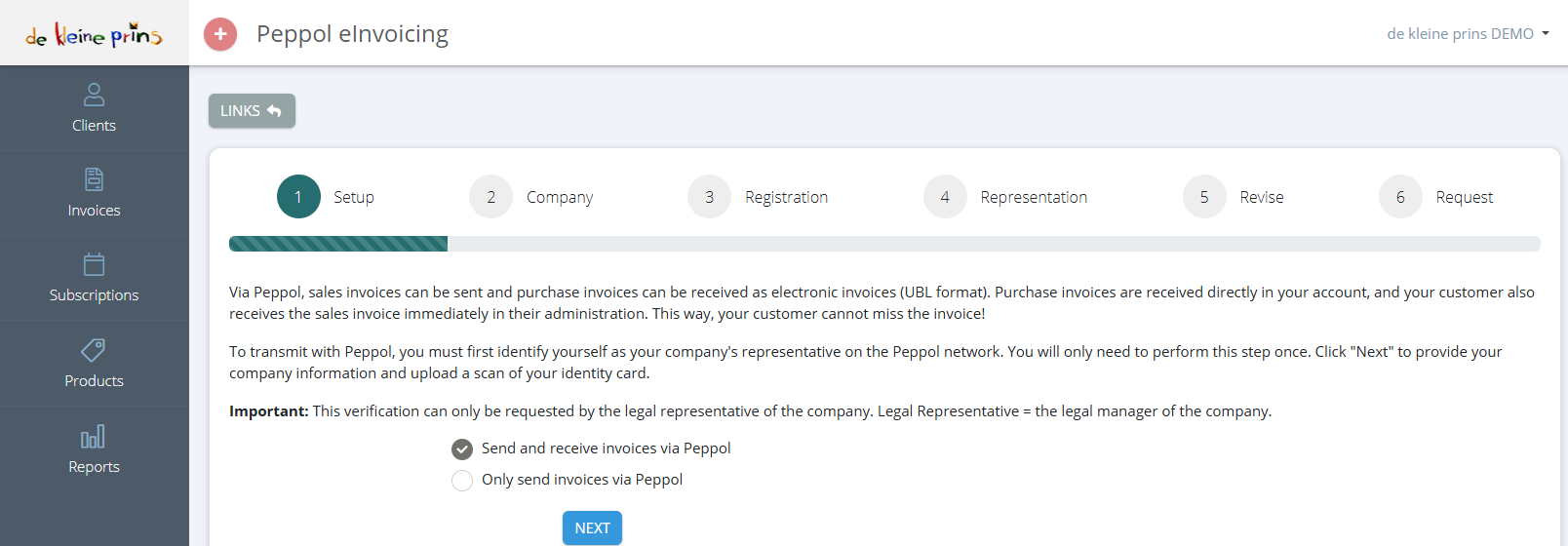
- The steps at the top: Setup, Company, Registration, Representation, Revise and Request.
- The choice between Send and receive invoices via Peppol and Only send invoices via Peppol. As a client of dkp, choose the second option. You do not receive your purchase invoices in The Rose but in The Lantern, where we activate reception via Peppol (VOILA by Codabox) for you. If you choose “send and receive” anyway, your purchase invoices arrive in two places and your accounts get confused.
- The identification. Registration may only be done by a legal representative of the non-profit, in practice a board member. Have that board member’s identity card at hand: you have to upload a scan or photo of it. Without that step your request is not approved.
After the request it usually takes one to a few working days before your Peppol registration is active. You are notified of that. From then on the Peppol tab appears as the first choice when sending.
Part 3: sending an invoice via Peppol
Create your invoice as always (course part 5). One requirement: the client’s VAT number must be filled in, because that is how The Rose looks up the client on the network. Then click Send:
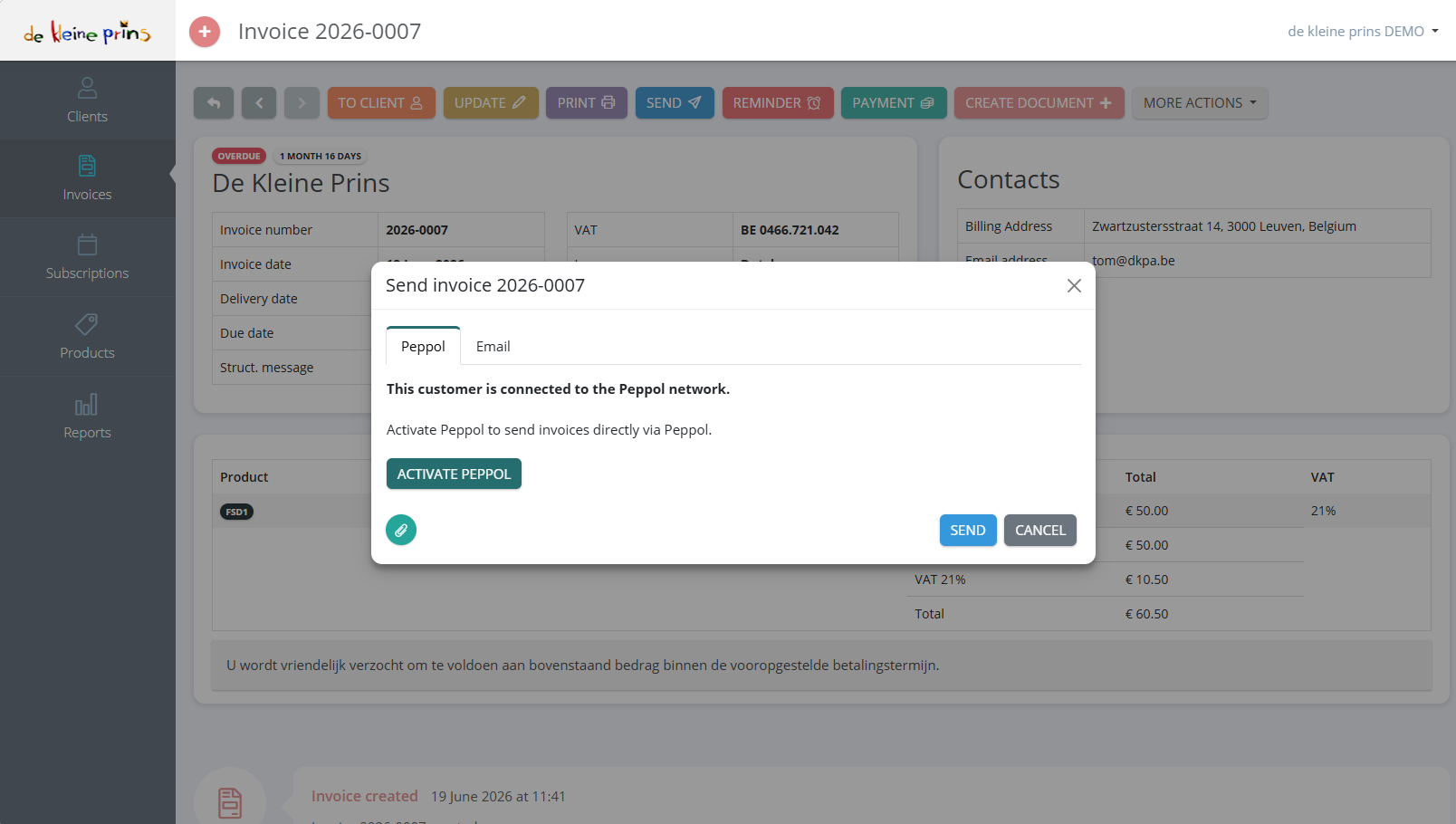
- The Peppol tab reports whether your client is connected to the Peppol network. If so, Peppol is the right choice.
- If your own registration is not yet active, you see the button Activate Peppol (as here in the demo file); it takes you to the wizard from part 2.
- Send: the invoice leaves as a structured file. In the history at the bottom of the invoice you see the transmission and, a little later, the confirmation that the client has received the invoice.
If your client is not found on the network (a foreign organisation, a private individual, a Belgian non-profit without VAT number), you simply choose the Email tab. For those clients there is no obligation.
Part 4: when a transmission fails
A Peppol transmission can be rejected by the network or by your client’s software. The Rose then shows an error message in the history. The most common causes:
- Client not found on the network. The client is not (yet) registered, or the VAT number is wrong. Check the number; ask the client whether they are on Peppol yet. If not: send by email and make a note of it.
- Order reference missing. Some clients, especially public authorities and large organisations, require a purchase order number or reference on the invoice. Fill in the Reference or purchase order field (course part 5) and send again.
- Two account numbers. Peppol accepts only one account number per invoice; if there are two in your layout, remove one.
- Client uses a GLN number instead of a VAT number to identify itself (occurs with large retailers and some public authorities). See the supplier’s article.
The articles on error messages at the bottom explain each message. If you cannot work it out, send the error message to your file manager.
Part 5: and the purchase invoices?
Peppol works in both directions, but in The Rose you only use the outgoing direction. Invoices that suppliers send to your non-profit via Peppol arrive automatically in the purchase folder of The Lantern, and from there in the accounts. You no longer have to upload them. If you notice that suppliers still send you invoices by email, give them your non-profit’s enterprise number as Peppol address. More about that in the course The Lantern.
State of the regulations: September 2026. Sources: law of 6 February 2024 (Belgian Official Gazette 20 February 2024) and the FAQ on efactuur.belgium.be.
Next step: your first invoice is out the door. In course part 8 you learn to register and track the payment.
The screenshots on this page show the English interface of our demo file in The Rose.