
Course The Lantern - comments, labels and sending to the accounts (#5)
Your documents are in the mailbox — time for the final step: sending them to the accounts. Before you send, you can give each document extra information with a comment or a label. In this part you get to know both, you send your documents, and you see what we at de kleine prins do with them next. To finish: why you no longer need to keep the paper originals afterwards.
Part 1: pass on information with a comment
A comment is a free text field that travels with the document into the accounts. Use it whenever a document needs an explanation that is not written on it:
- On an invoice from Colruyt: “catering for the volunteers’ meeting 12/09” — so we know straight away what the cost was for.
- On an expense claim: “advanced by the treasurer, already reimbursed”.
- An instruction for whoever handles the work list or makes the payments.
A well-placed comment saves phone calls and emails afterwards: the answer to “what was this for?” is already attached. And for us that information is worth gold: we can only post as accurately as the information that comes with the document. The more complete your submissions, the more accurate the accounts — and the more useful the reports later on.
Part 2: organise for yourself with a label
A label is a short term for your own use. It does NOT end up in the accounts, but helps you find documents back across the mailboxes and the archive — for instance all the documents of one event or one project. Do not confuse it with the cost picture per activity: that comes from analytical accounting, which you read more about in course part 6.
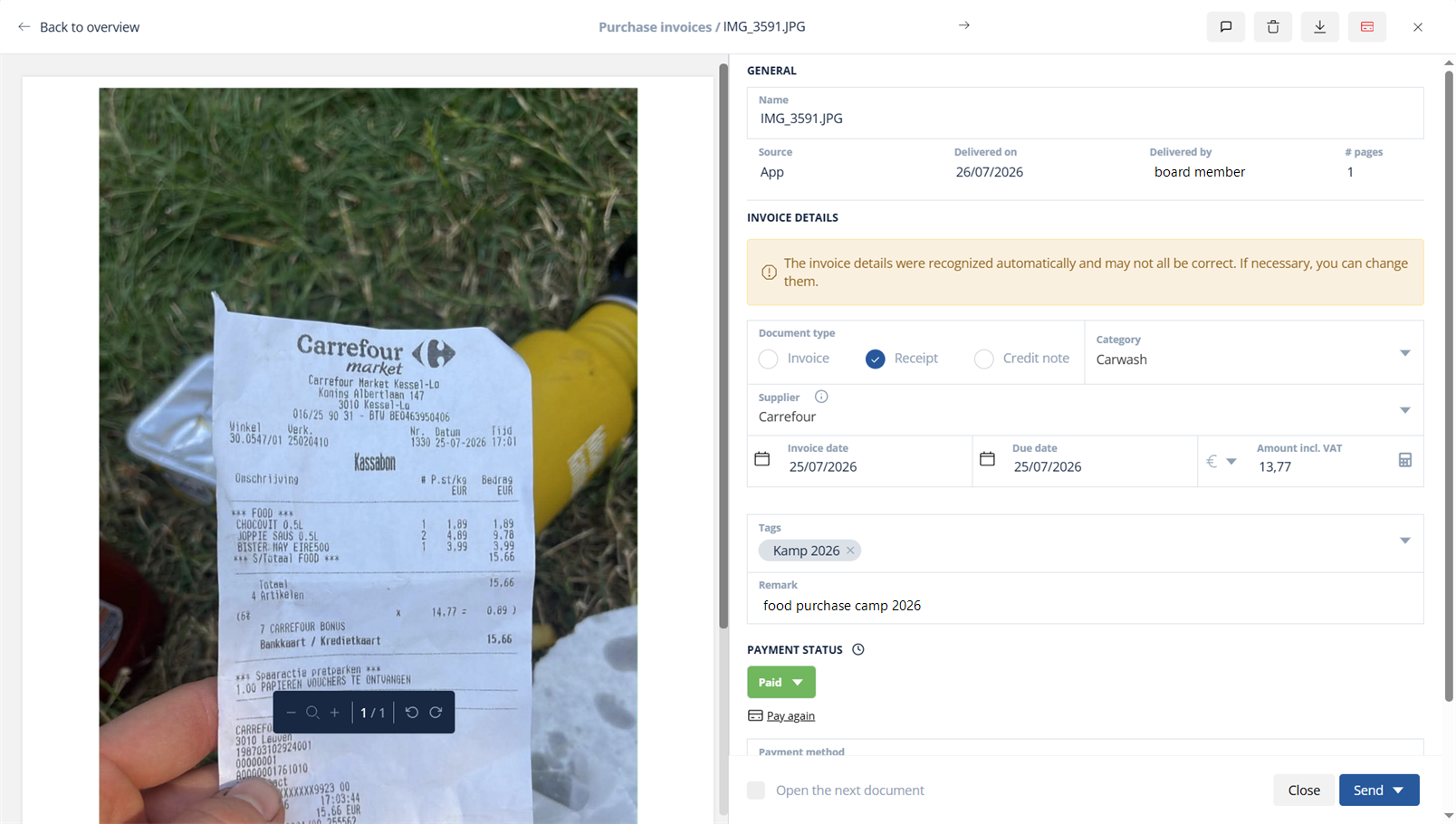
- The opened document with the comment field and labels.
Tip: agree within your organisation who uses which labels, and keep the list short. Ten clear labels are more useful than fifty variations on the same theme.
Part 3: sending to the accounts
Once your documents are ready — reviewed and, where useful, given a comment or label — you select them with the tick boxes and click Send at the top. That works per document or for several at once; the tick box at the top of the list selects everything in one click.
The choice of journal then appears right under the button: Purchases or Purchase credit notes. You can have credit notes numbered in a separate journal; it makes no difference for the accounts, so sending everything to the same journal is just as correct. If you do not know which choice is the convention in your file, ask your account manager once — after that it is routine.
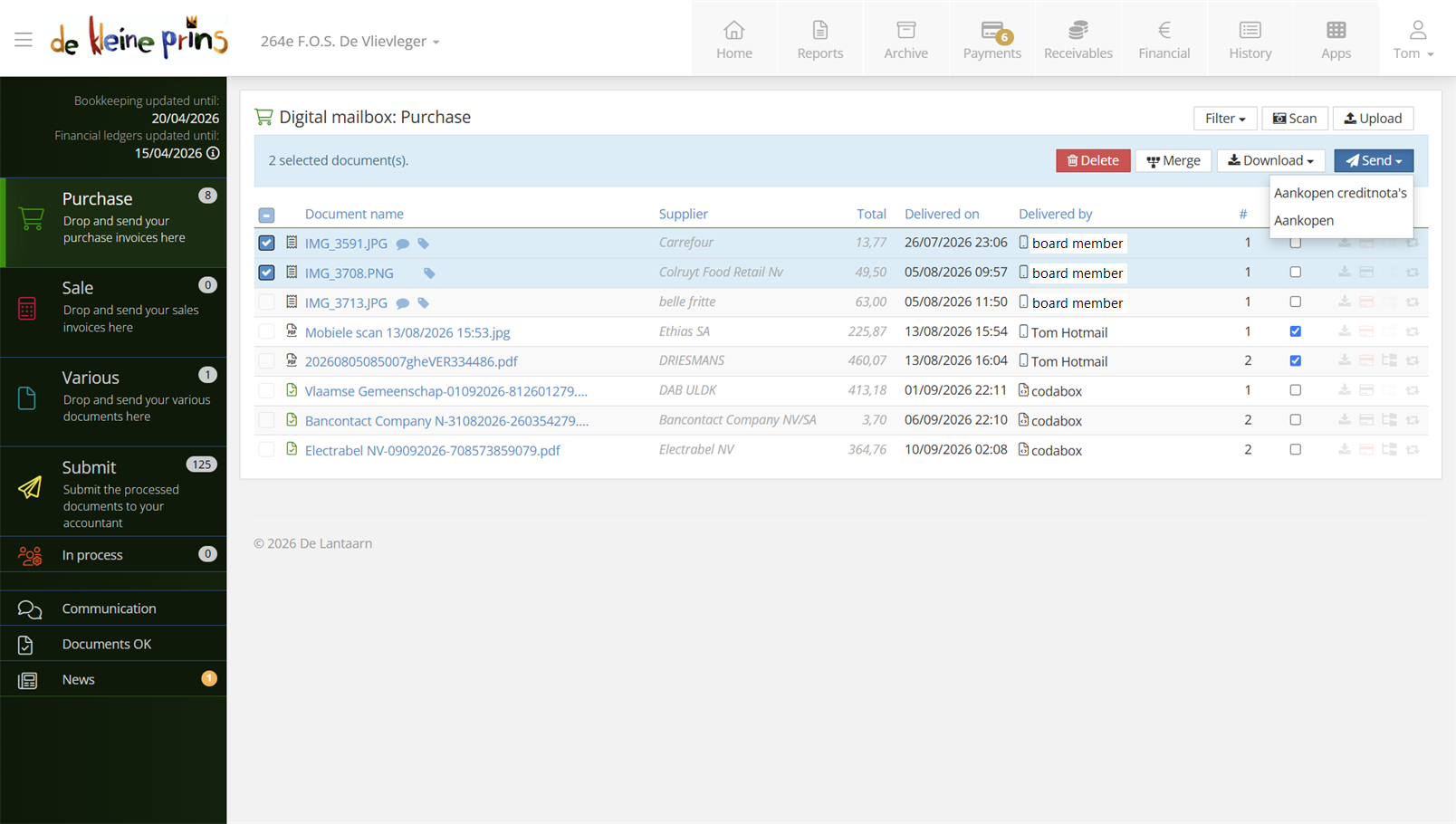
- The journal choice under the Send button, with the selected documents in the list.
Part 4: what we do next
After sending, the document disappears from your mailbox and the work starts on our side:
- The software reads the document’s details and prepares a posting proposal; our staff review it, complete it and process it in the accounts.
- As soon as the document is posted, you find it in the archive (course part 9), together with the accounting details, your comment and your labels.
- The figures flow through to Financial, History and the reports (parts 10 and 11) — that is how you see your accounts have been updated.
Many of our clients — certainly those who work analytically, or who want control over exactly where invoices are posted — moreover prepare the entries themselves in the work list, before we check them. After all, you know your documents best; put the allocation right at the source and you get accounts that are correct and reports that are right straight away. If you see the Submit folder in your menu, your file works that way — then definitely read course part 6. If not, we do all of this for you.
Part 5: do you need to keep paper originals?
No — and that may well be the nicest consequence of digital submission. A correctly digitised document (legible and complete, like your scan or photo in The Lantern) suffices as evidence; the paper original can then go. The documents themselves remain safely stored in your digital archive.
Do keep the principle in mind: accounting documents must be kept for ten years — digitally, that is, in The Lantern, where it happens by itself. Only for documents with a longer life of their own (contracts, deeds of ownership, insurance policies) do you keep the original for as long as it runs.
State of the legislation: September 2026. The retention period for accounting documents is ten years; digital retention is permitted as long as legibility and integrity are guaranteed. If in doubt about a specific document, ask your account manager.
Next step: that completes the basics — you can submit and send correctly. If your organisation prepares the entries itself, course part 6 is your next stop. If not, course part 7 starts the following-up block: tracking and paying your invoices.
The screenshots show a real file in The Lantern, in the English interface; a few images (the mobile app and the upload flow) still show the Dutch one — the layout is identical. Personal details have been redacted.