
Course The Rose - clients in other languages and foreign currencies (#15, optional)
A Flemish or Walloon partner, a Dutch sponsor, a European project with a German coordinator: sooner or later you invoice someone who does not read English. The Rose creates your documents and emails in Dutch, French or German, set per client, without you translating any of the fixed texts yourself. This part explains what happens automatically, what you have to do, and what to watch out for with foreign clients.
Part 1: setting a client’s language
First make sure the option Billing in foreign languages is switched on under Modules (in our demo file it is). Then open the client (course part 3) and choose the Language field under the heading Settings: Dutch, French, English or German. From then on:
- all documents for that client get the fixed texts in that language: “Invoice” becomes “Factuur” or “Facture”, the column headings, “Due date”, “Total”, the VAT mentions;
- the email goes out in that language, with the default text you set per language (remember the four tabs Dutch, French, English, German on the reminder note in course part 9). Check that you actually filled in those texts in every language you use;
- the same applies to reminders and quotations.
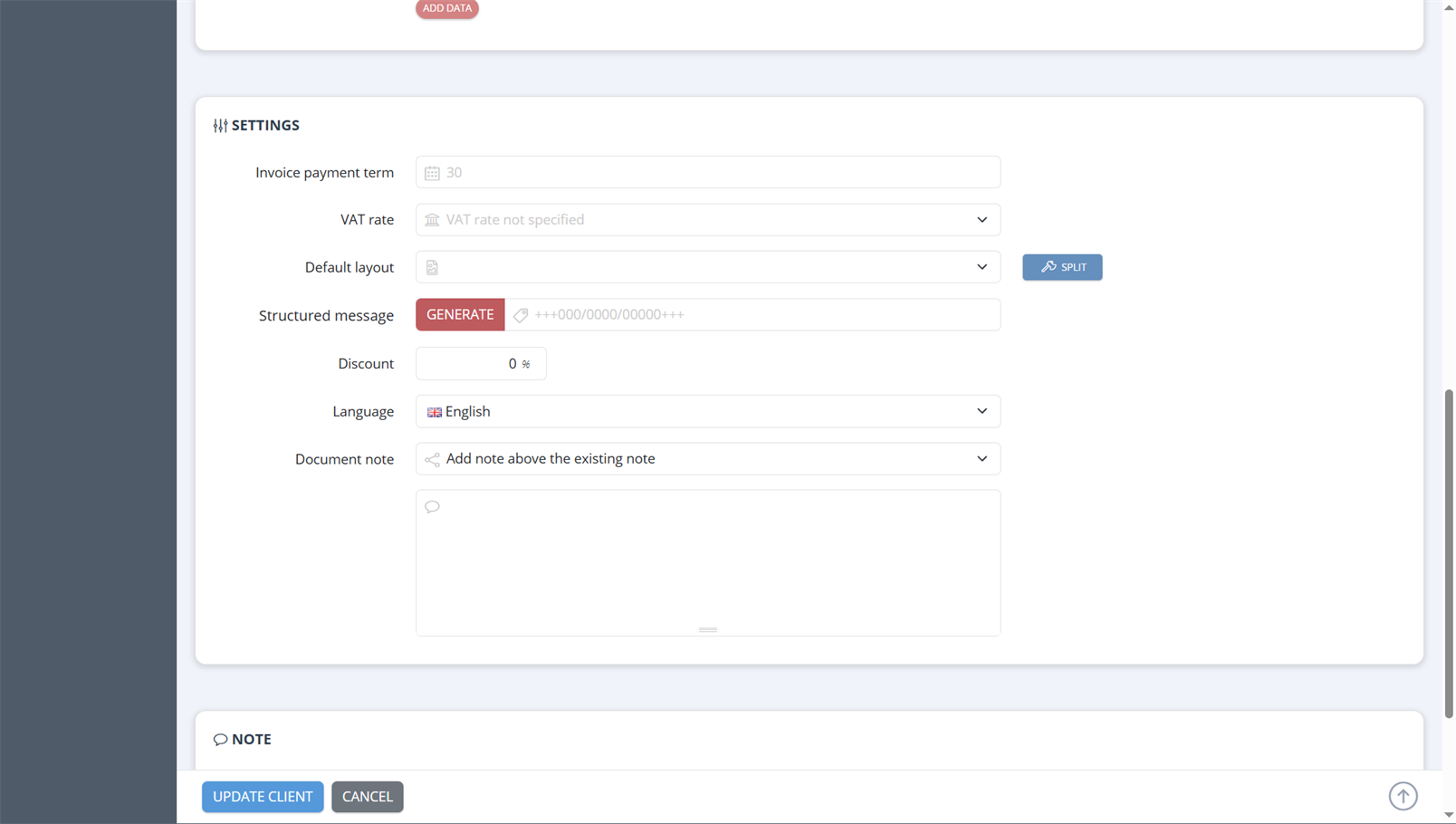
The Settings block at the bottom of the client form: Invoice payment term, VAT rate, Default layout (with Split to set one per document type), Structured message, Discount, Language (here English) and Document note.
You can also deviate from the language per document, for a one-off invoice to a contact person of a client who speaks another language.
Part 2: what you translate yourself
The fixed texts are translated by The Rose. What you fill in is not:
- the description of your products (course part 4). For products you invoice to clients in other languages, fill in the Dutch, French and German tabs above the description in the product form; The Rose then automatically picks the description in the client’s language;
- free text on an invoice, such as an informative line or an explanation;
- your fixed mentions in the layout (course part 14), e.g. your payment terms or the exemption mention. Create a separate layout with translated texts for those clients, or keep those texts short and bilingual.
An exemption mention in Dutch or French must say the same thing in substance; the legal reference (“art. 44 W.Btw” / “art. 44 CTVA”) remains the same provision.
Part 3: the language of your own screen
The language of the interface of The Rose (the menus, the buttons you see) is separate from the language of your documents. An existing account in The Rose can be set to Dutch, English or French, but you cannot do that yourself: that switch is made by us. If you want to work in English or French, email your file manager. The Dutch version of this course is under De Roos.
Part 4: an invoice in a foreign currency
By default you invoice in euros. For a client outside the euro area (a Swiss foundation, a British partner) you can choose another currency on the client. The Rose then uses an exchange rate that is fetched automatically on the invoice date, or a rate you fix yourself.
Two rules to remember:
- If your non-profit charges VAT, the VAT amount must always also be stated in euros on the invoice, whatever the currency of the invoice (VAT Directive 2006/112, art. 230, transposed in Royal Decree no. 1). The Rose puts that conversion on the document.
- The payment arrives in euros on your account, possibly for a different amount than invoiced because of exchange differences and bank charges. Register the payment for the amount received and report the difference to your file manager; it is an exchange result, not an unpaid balance.
Part 5: foreign clients and VAT
The language and the currency are the easy part. The VAT on an invoice to a foreign client is not, and deserves a word in advance because the mistake is visible on the invoice:
- Client is a VAT-registered business in another EU member state and you provide a service: as a rule the VAT is reverse-charged to the client. You charge no Belgian VAT, state the client’s VAT number (check it in VIES) and put the mention “VAT reverse charge” on the invoice. Your non-profit must have a VAT number for that and file an intra-Community listing.
- Client is a private individual or a non-VAT-registered organisation in the EU: usually Belgian VAT, as for a Belgian client. For some services (events, on-site education) different place-of-supply rules apply.
- Client outside the EU: often no Belgian VAT, with a different mention.
- Exempt non-profit (only art. 44): the exemption depends on the nature of the transaction, not on where the client is; but here too there are exceptions.
This is a question for your file manager par excellence, before you send the invoice. Create a draft, email the question, and adjust the VAT rate according to the answer. Correcting afterwards is only possible with a credit note (course part 10).
Peppol works internationally too, by the way: if your foreign client is registered on the network, the invoice can go via Peppol; otherwise by email.
State of the regulations: September 2026.
Next step: the last part, course part 16, on direct debit, payment links, advances, users, security and backups.
The screenshots on this page show the English interface of our demo file in The Rose.